Creating Invoices#
Create professional invoices with line items, tax, a chosen design, and flexible payment options. A live preview on the right updates as you type.
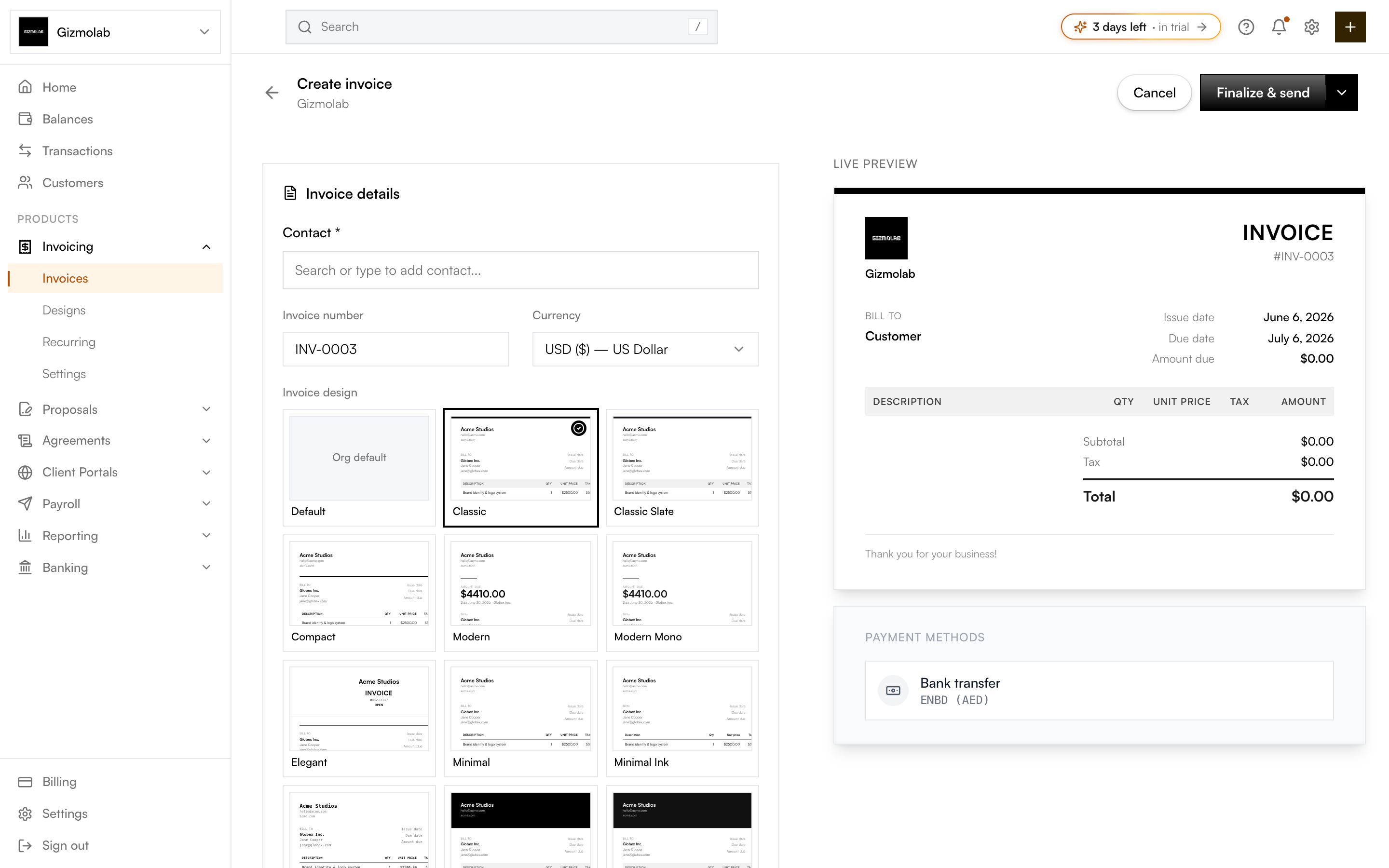
- 1Pick the customer
- 2Set the invoice number
- 3Choose the currency
- 4Pick an invoice design
- 5Finalize and send or save draft
- 6Live preview updates as you type
Invoice details#
- Customer — Select a contact (required). Search existing contacts or add a new one inline.
- Invoice number — A unique identifier. A next number is pre-filled from your settings; you can change it.
- Currency — The currency for the invoice amounts and display.
- Invoice design — Pick a visual theme, or keep Default to use your org default. See Designs.
- Show tax — Toggle the tax column and total on this invoice.
- Issue date, Payment term, Due date — Choosing a term (Due on receipt, Net 7/15/30, or Custom) auto-fills the due date from the issue date.
Line items#
Add one or more line items. Each row has:
- Description — What you're charging for.
- Qty — Number of units.
- Price — Price per unit.
- Tax % — Optional per-line tax rate.
- Disc. — Optional per-line discount.
The row shows the line Amount. Use Add item for more rows, and remove rows until one remains. You can also set an Invoice discount that applies to the whole invoice.
Tip
The subtotal, discount, tax, and total recalculate live as you edit line items, and the preview on the right reflects your chosen design.
Notes and custom fields#
- Memo — Notes or payment instructions shown on the invoice.
- Footer — Terms, legal text, or a thank-you note at the bottom.
- Custom fields — Optional reference fields such as a PO number or project code.
Finalize and send vs. save draft#
Use the split button in the top-right:
- Finalize & send — Saves, finalizes the invoice, and emails it to the customer (if they have an email address) in one step.
- Save draft — Saves as a draft so you can edit it and send it later from the invoice page.
Note
Saving a draft always works. Finalizing and sending requires a paid plan — if you can't send yet, your work is saved as a draft and you'll be prompted to upgrade.