Creating Payouts#
Payouts (called Payroll in the sidebar) let you send crypto to many recipients for salaries, vendor payments, contributor rewards, and more. You can use one lower-cost batch transaction or create a separate on-chain transaction for every recipient.
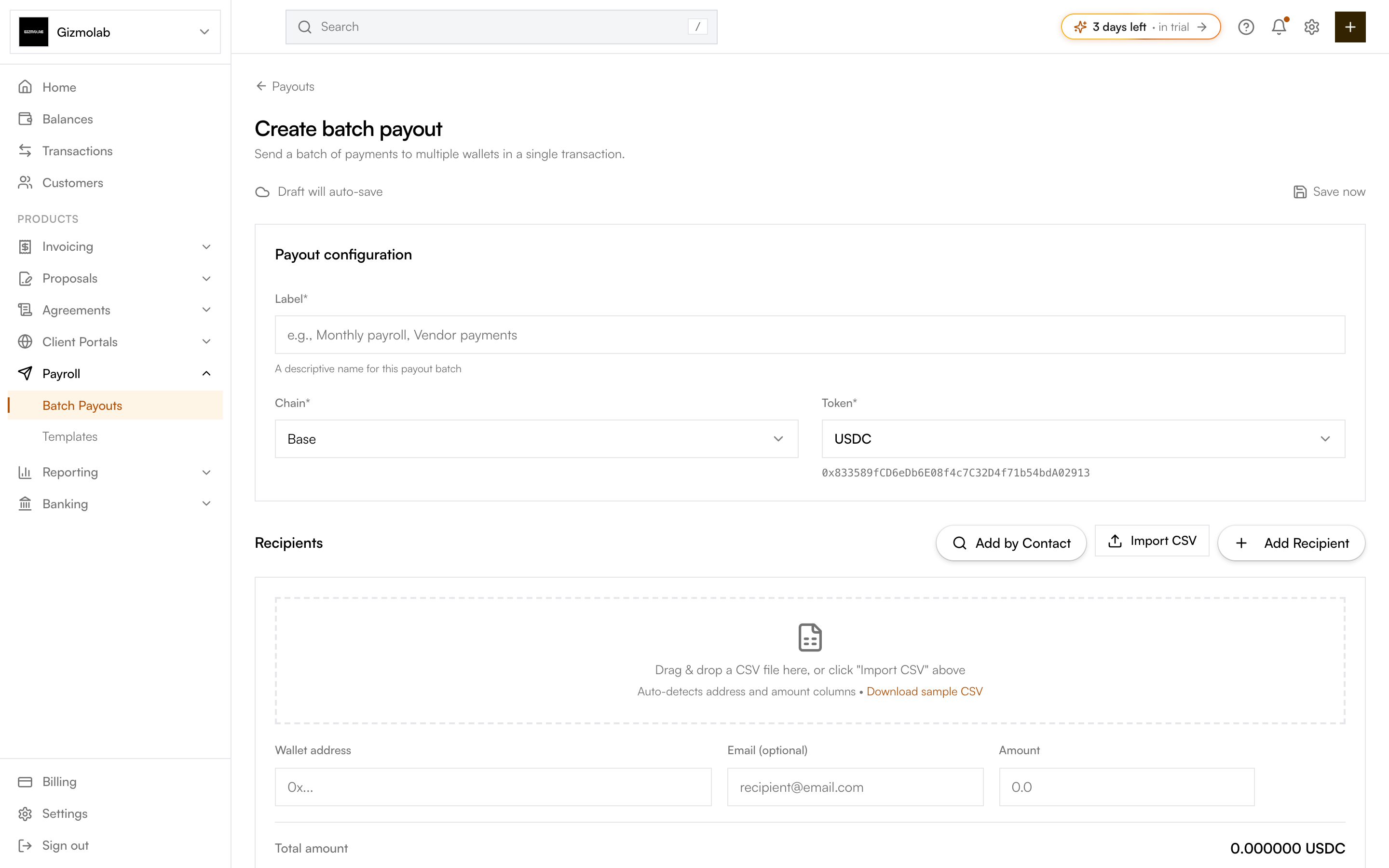
- 1Label this payout batch
- 2Pick the chain
- 3Pick the token
- 4Import recipients from CSV
- 5Add a recipient row
- 6Running total to send
Start a new payout#
Go to Payroll → Payouts and click New payout. Give the payout a Label (e.g. Monthly payroll, Vendor payments) so you can find it later.
Select the Chain (e.g. Base, Ethereum) and the Token (defaults to USDC). Native tokens like ETH are marked (Native) and need no approval.
Select Batch transaction to distribute through Gaslite in one transaction, or Individual transactions when every creator needs an independent transaction hash. Individual mode supports USDC and USDT on Ethereum and Base and creates exactly one transaction per creator.
For each recipient enter a wallet address (EVM, 0x...) and an amount. Email is optional. Use Add Recipient for one more row, Add by Contact to pull in a saved contact's wallets, or Import CSV to bulk add (see CSV Import).
The Total amount updates as you type. Matched contacts show their name next to the address. Individual mode shows the creator total, the N creator transactions, and the estimated ETH network fee with a 10% buffer.
Tip
Save reusable recipient lists as templates so recurring runs like monthly salaries pre-fill in one click.
Auto-save draft#
Payouts auto-save as drafts about two seconds after you stop editing. The status indicator at the top shows Saving, Draft saved, or a Retry option if a save fails, and you can press Save now at any time. Leave and come back later to keep editing or to execute.
Funding wallet#
For a batch transaction, choose where the funds come from:
- My wallet — Pays from your own connected external EVM wallet. Use Connect wallet or Change to pick it.
- Use TUSK — Pays from your org's treasury wallet. A Safe treasury needs a multi-sig proposal (handled in the Safe app for now); a standard treasury wallet must be connected to send.
The card shows the funding wallet's balance and, for ERC-20 tokens, its allowance status.
Individual mode always uses your Dynamic embedded EVM wallet to submit the creator transactions and pay gas. Choose one of these stablecoin sources:
- Embedded wallet — The embedded wallet holds the USDC/USDT and sends one
transferper creator. - Organization Safe — Connect the configured Safe through WalletConnect. The Safe approves the embedded wallet for the exact creator total, then the embedded wallet sends one
transferFromper creator.
The embedded wallet must have enough ETH for the estimated network fee plus the displayed 10% buffer, even when the Safe holds the stablecoins.
See Executing Payouts for approval, execution, and statuses.