Invoice Settings#
Invoice settings hold your branding, company details, and the defaults pre-filled on each new invoice. Open them from Invoicing → Settings.
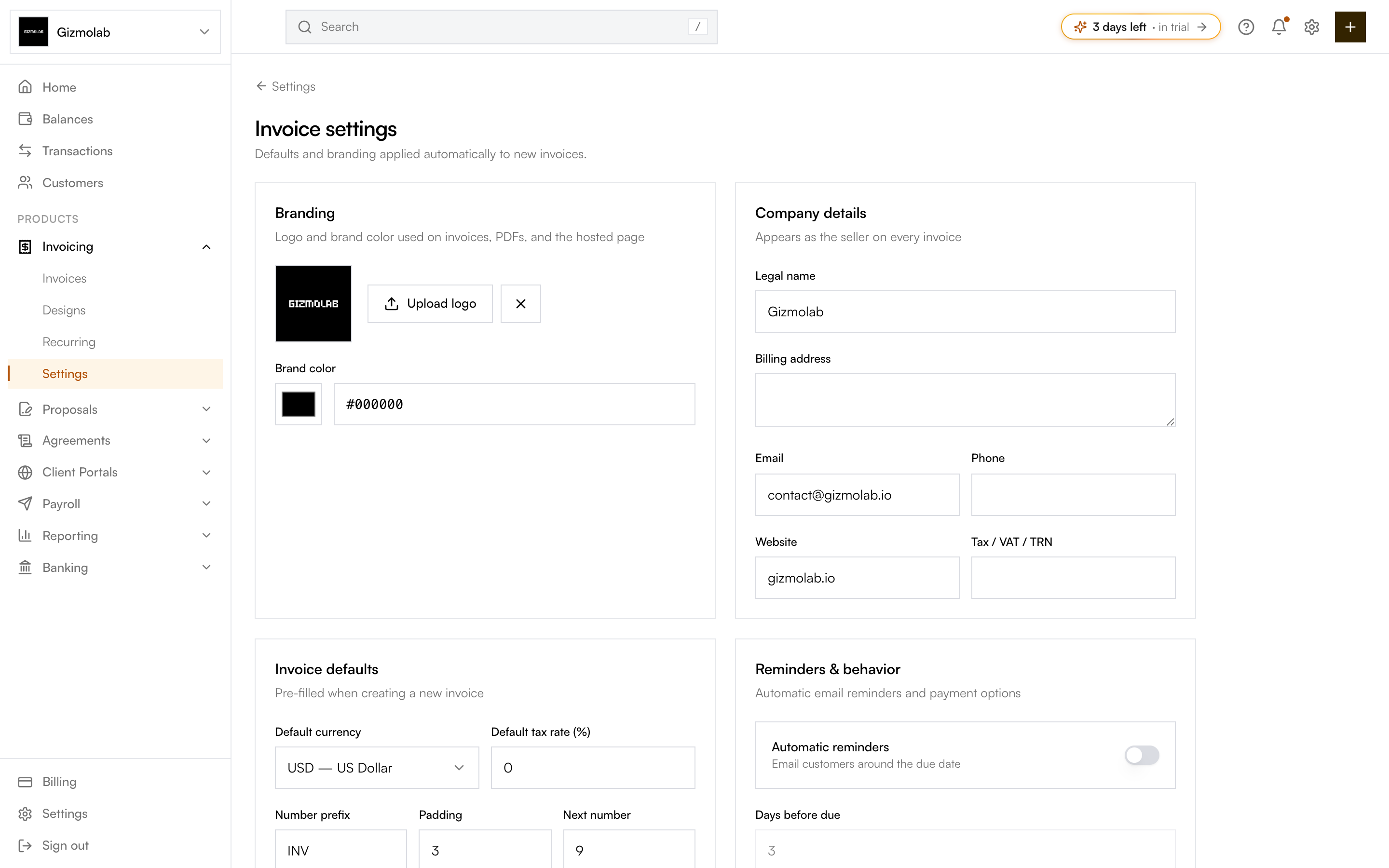
- 1Upload your logo
- 2Set your brand color
- 3Company details shown as seller
- 4Currency, tax, and numbering defaults
- 5Toggle automatic reminders
Branding#
- Logo — Upload an image (up to ~650KB) shown on invoices, PDFs, and the hosted page.
- Brand color — Used by your invoice design for accents and headers.
Company details#
The seller block on every invoice: legal name, billing address, email, phone, website, and tax / VAT / TRN.
Invoice defaults#
Pre-filled when you create a new invoice:
- Default currency and default tax rate.
- Numbering — A prefix (e.g.
INV), padding (e.g. 3 →001), and the next number to use. - Default payment term (with custom net days if needed).
- Default memo, default footer, and payment instructions.
Note
Only org admins can change invoice settings. Other members see them read-only.
Reminders and behavior#
- Automatic reminders — Email customers around the due date. Set days before due, on the due date, and days after due (each a comma-separated list).
- Allow partial payments — Let customers pay an invoice in installments.
Tip
Set your defaults once here and every new invoice starts pre-filled — you only change what's different for that customer.